Chapter 14: Working with General Agents: Claude Code and Cowork
You know why AI-driven development matters: and that it's happening right now, in 2026. But understanding transformation and experiencing it are two different things.
This chapter introduces you to Claude's General Agents:Claude Code and Cowork. These aren't just AI assistants; they're agentic AI systems that can reason through problems, make plans, and take action across domains.
What's a General Agent? An AI that observes, orients, decides, and acts: the OODA loop: executing actions rather than just generating text. Claude Code uses the terminal interface (for developers), while Claude Cowork uses the desktop interface (for knowledge workers). Both are powered by the same Claude Agent SDK.
The goal is not to build a supercomputer, but to establish Claude as your collaborative thinking partner for everything: and to build Skills that can become products.
The Claude Platform at a Glance
Before we dive into Claude Code and Cowork, take a moment to see the full landscape.
Claude in 2026 is not a single tool. It is eight integrated modes, each designed for a different kind of work. Most people only ever use Chat. This book focuses on the modes that build Digital FTEs: Cowork, Skills, Plugins, and Connectors, the professional-grade tools that turn domain expertise into deployable AI employees.
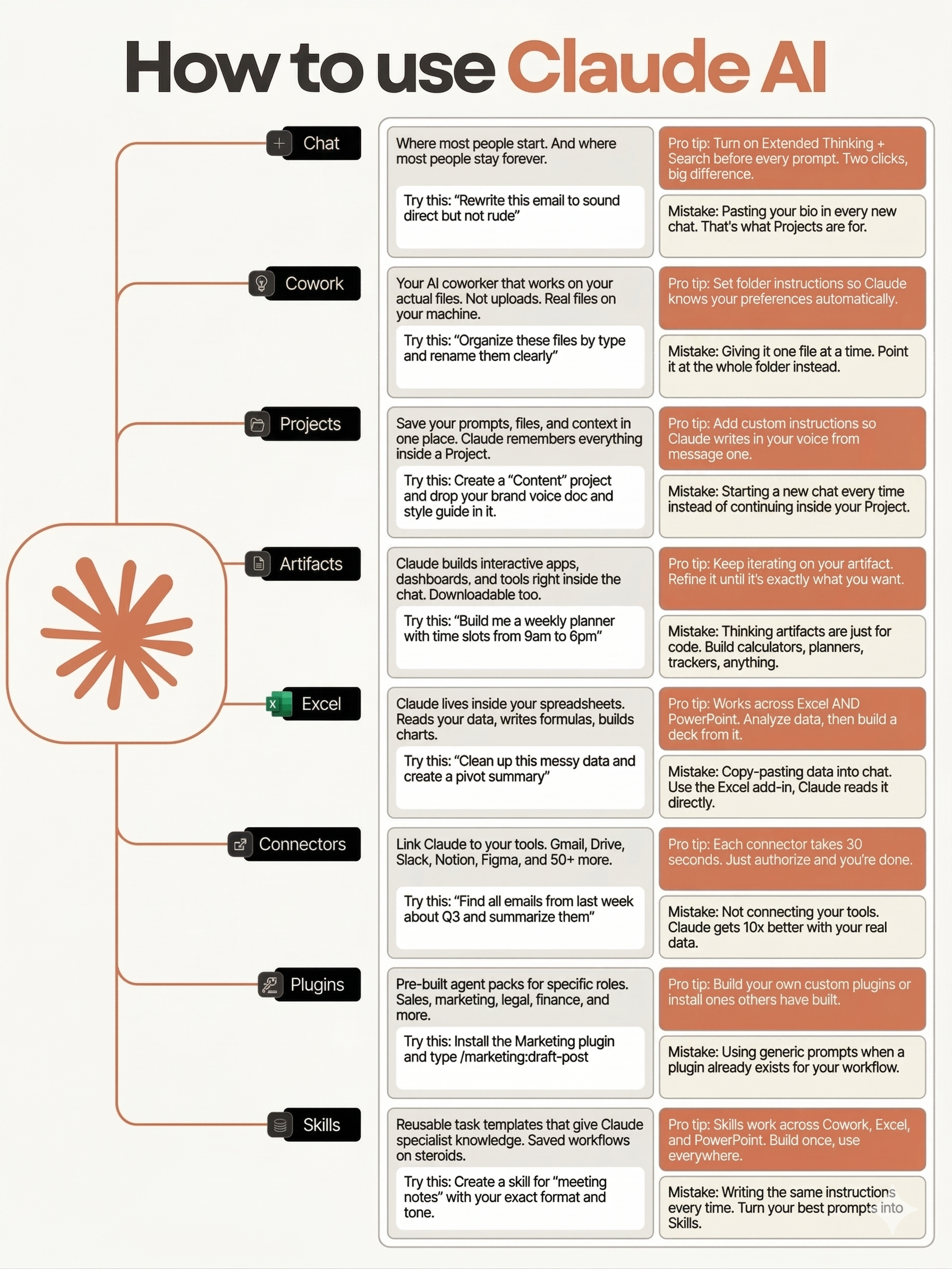
Figure 14.1; How to Use Claude AI: The Eight Modes
| Mode | What It Does | Where You'll Learn It |
|---|---|---|
| Chat | Conversational Q&A; where most people start and stay | Prerequisite |
| Cowork | AI coworker that works on your actual files on your machine | Section D |
| Projects | Save prompts, files, and context in one persistent workspace | Chapter 15 |
| Artifacts | Interactive apps, dashboards, and tools built inside the chat | Part 2 exercises |
| Excel | Claude inside your spreadsheets; reads data, writes formulas, builds charts | Part 3 |
| Connectors | Link Claude to Gmail, Drive, Slack, Notion, Figma, and 50+ more | Section B (MCP) |
| Plugins | Pre-built agent packs for specific roles; sales, marketing, legal, finance | Section C + Part 3 |
| Skills | Reusable task templates that give Claude specialist knowledge | Section B |
Why this matters: When you build a Digital FTE in this book, you are not building a chatbot. You are composing Skills, wiring Connectors, packaging Plugins, and deploying through Cowork or Claude Code. The infographic above is your map. Return to it whenever you need to remember where a capability lives.
What this chapter covers: Sections A through C teach Claude Code (the developer's terminal), Section D teaches Cowork (the knowledge worker's desktop), and Section E ties it to business strategy. By the end, you will have used at least 5 of these 8 modes hands-on.
📚 Teaching Aid
🖥️ Fullscreen
What You'll Learn
By the end of this chapter, you'll have:
- General Agents Explained; Understanding why Claude's agentic AI is fundamentally different from passive assistants: the OODA reasoning loop, the Product Overhang insight, and filesystem access as the universal interface
- Two Interfaces, One AI; Claude Code (terminal-based for developers) and Cowork (desktop-based for knowledge workers), both running on the Claude Agent SDK
- Claude Code Installed & Working; Complete setup with multiple paths: Official Claude Pro/Max subscription (Lesson 2), OR free backends via OpenRouter, Gemini, or DeepSeek (Lesson 3)
- Hello World; Mastering the CLI interface (Lesson 4): slash commands, permission loops, and safe usage patterns
- Persistent Project Context; Creating CLAUDE.md files (Lesson 5) that eliminate repetitive context-sharing and establish team memory
- Practical Problem-Solving Exercises; 27 hands-on exercises across 8 modules (Lesson 6) building problem decomposition, specification writing, and quality verification skills
- Teach Claude Your Way; Mastering custom instructions (Lesson 7) to align Claude's behavior with your personal or team standards
- Autonomous Expertise; Agent Skills (Lessons 8-9) with prompt patterns (Persona + Questions + Principles)
- Agent Skills Exercises; 27 hands-on exercises (Lesson 10) from skill anatomy to production-ready skill suites and capstone projects
- Subagent Orchestration; Recognizing when Claude automatically delegates to specialized agents (Lesson 11) for complex tasks
- External Integration; MCP servers (Lesson 12) for safe access to external systems
- Token Optimization; Compiling MCP servers to Skills (Lesson 13) for 80-98% token reduction
- Configuration Mastery; Settings hierarchy (Lesson 14) and precedence rules for team collaboration
- Event-Driven Automation; Hooks (Lesson 15) for custom behaviors triggered by events
- Complete Extensibility; Discovering and using plugins (Lesson 16)
- Autonomous Iteration; The Ralph Wiggum Loop (Lesson 17) for self-correcting workflows
- The Creator's Workflow; How Boris Cherny (Lesson 18) uses Claude Code effectively
- Plugins & Extensibility Exercises; 15 hands-on exercises across settings, hooks, plugins, and autonomous iteration (Lesson 19)
- Agent Teams; Coordinating multiple Claude instances as a team with TeamCreate, TaskCreate, and SendMessage (Lesson 20)
- Agent Teams Exercises; 10 hands-on exercises practicing team creation, task coordination, quality hooks, and multi-agent workflows (Lesson 21)
- Worktrees; Parallel agent isolation using git worktrees for safe, independent workstreams (Lesson 22)
- Remote Control; Sessions without boundaries: control local Claude Code from any device via secure relay (Lesson 23)
- Scheduled Tasks; The /loop skill for recurring checks, one-time reminders, and cron tool lifecycle management (Lesson 24)
- Channels; Event-driven automation that lets agents react to file changes, git commits, and external triggers without polling (Lesson 25)
- Claude Cowork Fundamentals; From terminal to desktop (Lesson 26), getting started (Lesson 27), and practical workflows (Lesson 28)
- Browser Integration; Claude in Chrome (Lesson 29) for web-based automation
- Plugins and Connectors; Pre-built integrations with Google Workspace, Notion, Slack, and more (Lesson 30)
- Safety, Limitations & What's Coming; Understanding boundaries, responsible use, and the future of agentic AI (Lesson 31)
- Built-in Document Skills; Working with docx, xlsx, pptx, and pdf files (Lesson 32)
- Dispatch; Assign tasks to Cowork from any device: mobile, tablet, or another machine (Lesson 33)
- Computer Use; Let Claude control your screen: clicking, typing, and navigating desktop applications autonomously (Lesson 34)
- Projects and Scheduling; Organize your AI workflows with persistent project contexts and scheduled task execution (Lesson 35)
- Custom Visuals; Interactive diagrams, charts, and data visualizations generated on demand inside Cowork (Lesson 36)
- Decision Framework; Choosing between Code and Cowork (Lesson 37)
- From Skills to Business; Understanding how Skills become monetizable products (Lesson 38), the Digital FTE model, and the path to revenue
- Cross-Vendor Landscape; How Claude Code concepts (CLAUDE.md, Skills, MCP, hooks, teams) map to OpenAI Codex, Google Gemini CLI, and emerging industry standards (Lesson 39)
- Business Strategy with AI; 10 MBA-level frameworks (Porter's Five Forces, disruption analysis, financial statements, leadership) applied to your business using Claude and the StratArts plugin (Lesson 40)
- Chapter Quiz; 50-question interactive assessment (Lesson 41) covering all chapter concepts
Continue to Section A: Claude Code Essentials →