Computational considerations
 Instruction and application
 Complete
Have you ever wanted to buy a video game (or other software) but found that your computer doesn’t have the hardware requirements necessary to run it? Hardware limitations are frustrating and come into play any time we want to use something that is computationally powerful or expensive - whether that is the latest game or an advanced ML technique.

After learning about some advanced ML techniques, you might be excited to try them out. However, you first need to check the operational and computational factors that are available so you know what is feasible.
Understanding what is possible will allow you to determine which techniques or methods you can use to achieve your organisation’s goals.
In this section, we will run through hardware requirements and other considerations for building models.
Hardware requirements
 Often the limiting factor when training a model is the hardware you have available. Depending on what your organisation provides, you will be constrained in terms of available options and processing time.
To help you determine what is possible, let’s look at the different options available and see how they affect model training. As we work through this content, check what you have available in your organisation to build a landscape of what is possible for your model building.
Processing unit
A processing unit is an electronic circuit that executes instructions from software. It fetches, decodes and carries out these instructions to perform various operations.
Think of it as the workhorse that performs the computations needed to train your ML models. The processing unit you have available will determine the complexity of models you can train.
Let’s take a look at some common architectures:
**Central processing unit (CPU)**This is the “brain” of your computer and is designed for general-purpose tasks and has a few powerful cores optimised for low-latency serial processing.
CPUs are generally limited to training smaller, less complex models with few parameters (like linear or logistic regression, support vector machines and decision trees on small-to-medium size datasets).
- They are suitable for data preprocessing and feature engineering tasks.
- Compared to GPUs and TPUs, training times can be significantly longer (especially for deep learning models where complex tasks can take weeks or months).
- As they are standard in most computers, they are readily accessible and suitable for initial experimentation and smaller projects. **Graphics processing unit (GPU)**Originally designed for graphics rendering, GPUs have thousands of smaller cores optimised for high-throughout parallel processing, making them highly efficient for the processes found in techniques like deep learning.
This processing unit enables the training of much larger and more complex deep learning models (like neural networks for image recognition or object detection).
-
Compared to a CPU, the training time for deep learning models is drastically reduced due to its parallel processing capabilities.
-
High-end GPUs can be expensive and might require dedicated hardware. However, they are widely available through cloud computing platforms. **Tensor processing unit (TPU)**Custom-designed by Google specifically for ML, this cloud-based resource excels at tensor computations essential for neural networks. They are highly optimised for training very large and complex neural networks, often achieving far better performance and efficiency than GPUs.
-
Large language models and other advanced NLP applications are trained using this processor type.
-
TPUs are designed to provide the fastest training times for large-scale deep learning models but as they are usually a cloud-based resource, can be very expensive to run.
Tip
If you only have your organisation-provided laptop, it is likely a CPU is all you will have available (unless you have been given a high-end computer with a GPU). If you want to train more complex models, you will need to get access to a cloud-based GPU or TPU.
Memory constraints
Processing units come in different sizes, with Random Access Memory (RAM) determining how much it can handle.
RAM is the CPU’s main memory and during ML tasks, it is used to:
-
Load and preprocess the dataset.
-
Hold the model architecture definition.
-
Store intermediate computations performed by the CPU.
-
Manage the overall execution of the training script. If you are using a GPU or TPU, it is called Video RAM (VRAM) which accelerates the computations involved with deep learning because:
-
The model’s parameters reside in VRAM during training and inference.
-
The batches of training data being processed by the GPU/TPU need to be loaded into VRAM.
-
Intermediate activations are also stored in VRAM during the forward/backward passes of training.
-
Optimisers often maintain state for each parameter, which consumes VRAM. So how does the amount of memory constrain our model building?
**It limits data size.**If your dataset is larger than the available RAM, you won’t be able to load it all at once for preprocessing or training.**It limits model size.**The size of a ML model is largely determined by the number of parameters. Each parameter needs to be stored in memory (primarily VRAM for deep learning). Models with billions of parameters, like large language models, require GPUs or TPUs with very high VRAM capacities.Consequences of insufficient memory.If you don’t have enough memory available for the task you are trying to achieve, you might get an “Out of Memory (OOM)” error, which will cause the process to crash because there isn’t enough space to allocate the necessary data structures.
If it doesn’t crash, you will find the training process will become significantly slower or that you might be forced to use smaller models or batch sizes, potentially sacrificing accuracy.
Key point
The more memory your processing unit has available, the more it will be able to achieve when training a model. If you find your hardware cannot handle what you want to build, you might need to move to a better machine or spend more on a cloud-based service.
Interconnect bandwidth
Imagine a highway connecting different cities. Each city is an individual processing unit or memory bank and the highways are the physical and logical connections between these units.
Interconnect bandwidth is the width and speed of these highways, determining how much data can be transferred between the units in a given amount of time. In a ML system, this can be:
- Between multiple GPUs/TPUs in a distributed learning system.
- Between processing units and computer memory. When we are training models, massive amounts of data and complex computations may be passed between the different units. Efficient training and inference rely on the ability to move this data quickly, so how does bandwidth constrain our model training?
ConstraintDescription Distributed training efficiencyIn multi-GPU/TPU setups, the gradients calculated on each unit need to be aggregated. Low bandwidth can lead to significant delays as processing units spend more time waiting for data exchange than performing computations, slowing down the training process.Data transfer speedMoving large datasets from memory to processing units needs sufficient bandwidth. Insufficient bandwidth can starve the processing units, making them sit idle while waiting for data.Model parallelismFor extremely large models that cannot fit onto one device, we need to distribute different parts across multiple processors. If bandwidth is low, this becomes impractical due to the communication overhead outweighing the benefits of the distributed computation.ScalabilityAs you scale up the number of processing units to train larger and more complex models, the interconnect infrastructure needs to scale accordingly to maintain efficiency. If the bandwidth isn’t up to the task, you will get bottlenecks that prevent you from realising the full performance gains from adding more hardware.So on top of the processing unit and memory available, you also need to think about how quickly the data can be transferred internally. More powerful models will require better interconnected bandwidth.
Lightweight approaches
Now we have seen the hardware constraints that affect our model training, let’s look at some approaches we can use which are lightweight, or in other words, can make the most of our existing hardware by modifying the model or training process with minimal added computational overhead.
Model compression techniquesThese aim to reduce the size and complexity of the model without significant loss or accuracy:
-
Pruning: In a neural network, remove less important weights (connections) leading to a sparser model that requires fewer computations (and less memory).
-
Quantisation: Reduce the precision of the weights, drastically reducing memory footprint and therefore speed up computations on hardware optimised for lower precision.
-
Knowledge distillation: Train a smaller “student” model to mimic the behaviour of a larger, well-performing “teacher” model. The student model learns the essential mappings without needing the same capacity.
-
Low-rank factorisation: Decompose weight matrices into lower-rank matrices, significantly reducing the number of parameters.Gradient accumulationInstead of processing a large batch of data at once, process smaller batches sequentially and accumulate their gradients before performing a weight update. This effectively simulates training with a larger batch size using less memory.Mixed precision trainingStrategically use different numerical precisions (e.g. 16-bit for most computations and 32-bit where necessary for stability). This can offer a speedup and reduce memory usage.Efficient layer architecturesUse model building blocks that are inherently more parameter-efficient and computationally lighter. For example:
-
**Depthwise separable convolutions:**Used in models like MobileNets, these significantly reduce the number of parameters and computations compared to standard convolutions.
-
Linear transformers: Offering potentially better scaling with sequence length than traditional transformers with lower computational cost in certain scenarios.**Data parallelism with efficient aggregation **When using multiple processing units, optimising how gradients are shared and aggregated can reduce communication overhead and improve scalability even with limited interconnect bandwidth.
Techniques like gradient compressors or asynchronous updates can be useful.
If you are finding your model training is becoming computationally inefficient, try researching some of these techniques to see if they can boost your model productivity.
Heavyweight approaches
If a lightweight approach doesn’t work, you might need to up the ante and use a stronger approach. These methods typically involve significant changes to the training infrastructure or the fundamental way training is performed, so will likely require buy-in from key stakeholders to get them approved.
Distributed trainingThis involves using multiple GPUs or even multiple machines to parallelise the training process. This directly addresses limitations in processing power and memory by sharing the workload.
PyTorch Distributed and TensorFlow distributed provide tools for this.
We will explore this concept in more detail later on.
Specialised hardwareIf your CPU isn’t strong enough to handle your model needs, you might need to invest or utilise hardware which is specifically designed for ML, such as GPUs or TPUs.Cloud-based trainingAlternatively, you can leverage the vast computational resources available in the cloud. This provides access to powerful hardware on demand, but does come with significant costs.Federated learningThis is a decentralised approach that trains models across a large number of decentralised clients (e.g. mobile devices) while keeping the training data local.
This addresses data privacy concerns and can enable training on massive datasets that wouldn’t fit on a single machine (but does bring interconnect bandwidth into play).
If you need to level-up your processes to train the models you need to meet your organisational goals, you may need to convince your organisation to use one of these techniques.
When doing this, you will need to weigh up the costs (both in terms of money and environmental impact) against the potential benefits.
Distributed training infrastructure
Previously, we mentioned distributed training as a method to get around some of our hardware limitations, but what does it involve?
Let’s explore this concept in more detail.
What is it?
Distributed training involves leveraging multiple processing units (typically GPUs, but sometimes CPUs) working together to train a single ML model.
Instead of relying on the computational power and memory of one machine, the workload is divided and processed in parallel across several devices. These devices can reside within a single powerful server or across a cluster of interconnected machines.
It helps us circumvent hardware constraints by:
- Increasing computational power by pooling capabilities of multiple units.
- Providing larger memory capacity by increasing the total memory available.
- Improving scalability by adding more processing units to complement the increasing data sizes. Let’s take a look at some of the components used in this process.
Orchestration systems
These are platforms (or tools) that automate and manage complex workflows across multiple systems, applications and services.
Like a conductor leading an orchestra, they ensure all the different “instruments” play their part at the right time and in the right sequence to achieve a trained and deployed model.
They help us:
- Define and automate the steps involved in the ML lifecycle, from data preparation to model training and deployment.
- Coordinate different resources like data storage, processing units (CPUs, GPUs), and networking infrastructure.
- Manage the dependencies between different tasks, ensuring that one task only starts when the preceding ones are complete.
- Monitor the progress of our ML workflows and handle potential errors or failures.
Fault tolerance
In a distributed training environment with multiple interconnected components, the probability of failures (e.g., hardware issues, network interruptions) increases. Fault tolerance mechanisms are essential to ensure that training jobs can continue or recover from such failures. Common techniques include:
- Checkpointing: Periodically saving the state of the training process (model weights, optimiser state, etc.) to persistent storage. If a failure occurs, training can be resumed from the last saved checkpoint, avoiding a complete restart.
- Redundancy: In some cases, critical components or processes might be duplicated to provide backup in case of failure.
- Automatic restart and recovery: Orchestration systems can be configured to automatically detect failures and restart failed processes or jobs.
- Robust communication protocols: Using reliable network protocols and implementing mechanisms for handling communication errors (e.g., retries).
Types of parallelism
When using a distributed training system, there are two primary strategies we might use:
Data parallelismThe most common approach. The entire model is replicated across all processing units. The training dataset is divided into smaller batches, and each processing unit trains its replica of the model on a different batch of data. After each batch (or a set of batches), the gradients computed by each unit are aggregated (e.g., averaged), and the model weights are updated synchronously across all replicas.
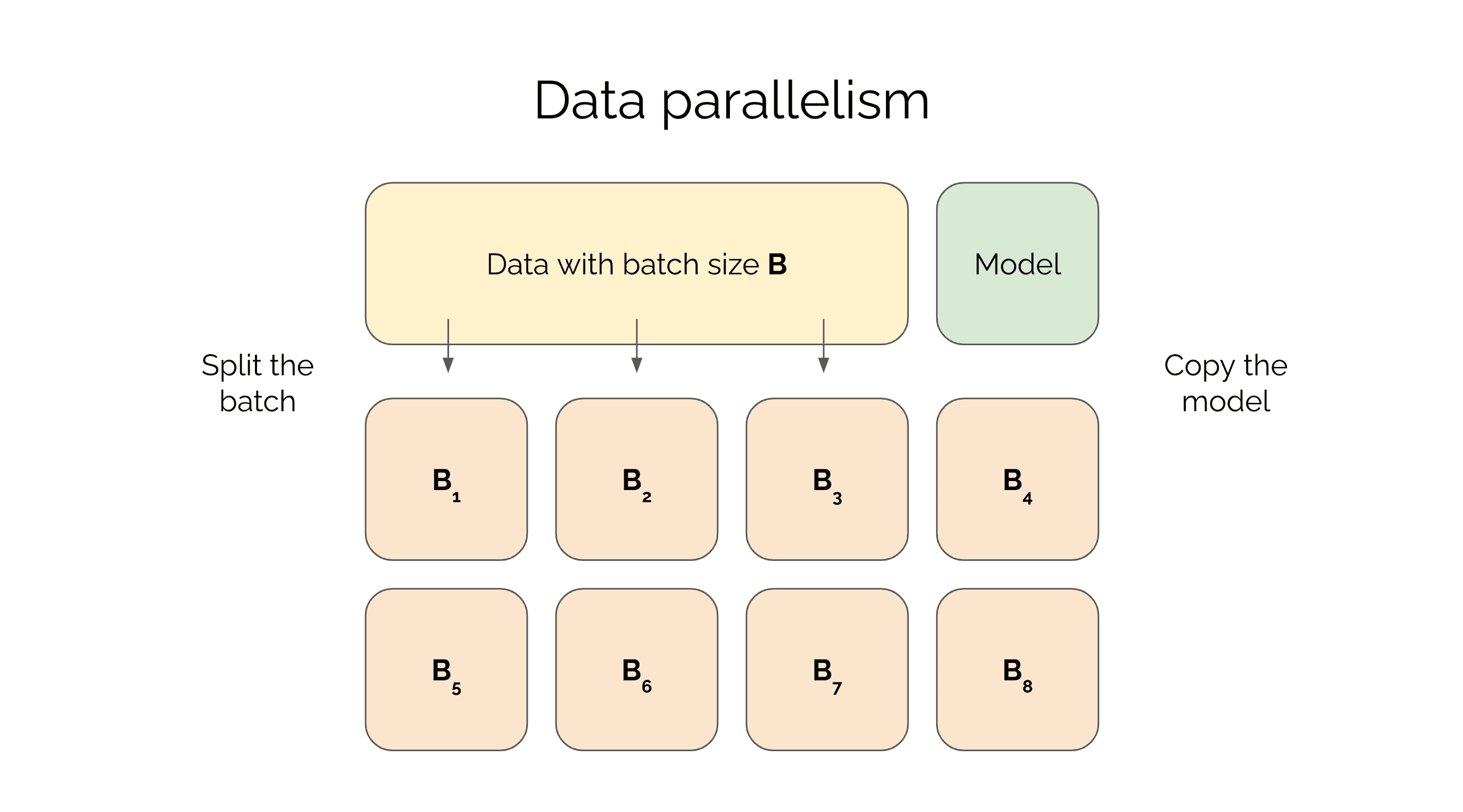 - Benefit: Relatively straightforward to implement and often scales well, especially when the model can fit on a single processing unit's memory.
- Constraint: Communication overhead for gradient aggregation can become a bottleneck as the number of processing units increases or the interconnect bandwidth is limited.Model parallelismUsed when the model is too large to fit on the memory of a single processing unit. Different parts (layers or sub-networks) of the model are assigned to different processing units. During the forward and backward passes, data and intermediate activations are passed between these units.
- Benefit: Enables training of very large models that would otherwise be impossible.
- Constraint: Can be more complex to implement efficiently, as it requires careful partitioning of the model and can lead to imbalances in workload and significant communication overhead between the processing units. Overall, choosing between data and model parallelism depends on your model size, hardware constraints, and the trade-off between simplicity and scalability.
Action item: Pause and think.
Take a few minutes to reflect on what you've learned in the context of your role and organisation.